
Skills
Create reusable skill packages, inspect the files behind them, and install linked skills into Claude, Codex, or OpenCode through a reviewed impersonation workflow.
Overview
Skills are reusable packages that carry instructions, files, and supporting material a coding agent can use.
They matter in ArchAstro because they bridge two worlds:
- the remote agent definition in the platform
- the local coding environment where developers and coding agents actually work
That bridge is what makes skills more than documentation. They can become part of the day-to-day developer loop.
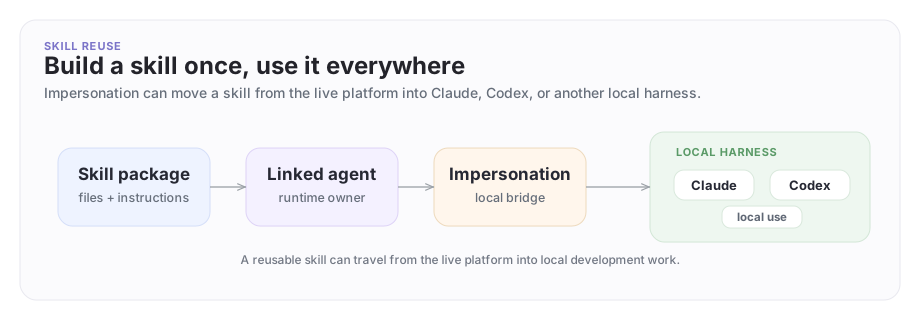
The skill reuse model
A skill can be defined once, linked to an agent, then installed into the local coding harness through impersonation.
A concrete example
Suppose Company A has an incident-review skill that helps engineers diagnose rollout failures:
- which logs to inspect first
- how to search the right troubleshooting corpus
- what to post back into the shared rollout thread
Company A links that skill to its Platform Support Agent.
Then a developer or coding agent can:
- impersonate the support agent
- list linked skills
- install the incident-review skill into Claude or Codex
- use the same operational guidance locally while debugging the live issue
That is a strong example of a trusted cross-company debug loop when Company A has explicitly approved the operator access needed for the incident.
Create and inspect skills
List all reusable skills:
archastro list skills
archastro describe skill <slug>
Create one directly:
archastro create skill \
  -n "Incident Review" \
  -d "Checklist and steps for rollout incident diagnosis" \
  -s incident-review \
  --file ./skills/incident-review/SKILL.md
You can also inspect and manage the files behind a skill:
archastro describe skillfile incident-review SKILL.md
archastro create skillfile incident-review references/checklist.md --file ./references/checklist.md
archastro update skillfile incident-review SKILL.md --file ./skills/incident-review/SKILL.md
That matters because a skill is not just a name. It is a versioned bundle of files that can actually guide work.
Inspect which skills are linked to an agent
There are two layers to understand:
- the reusable skill definitions
- the links from those skills into a specific agent
Inspect the links like this:
archastro list agentskills --agent <agent_id>
That is the command you use when a developer asks, "Which skills does this live agent actually carry?"
Install a linked skill into your coding harness
This is where skills stop being passive documentation.
What a skill package actually contains
A skill is anchored by SKILL.md and can include supporting files beside it.
In practice, teams often keep:
SKILL.mdfor the main operating instructions- references or checklists under subpaths such as
references/ - any other supporting text files the local coding workflow needs
The useful question is not "What is the full abstract schema?" It is "What files does this skill bundle carry, and are they the right ones for the job?"
You can inspect that directly:
archastro describe skill <slug>
archastro describe skillfile <slug> SKILL.md
If impersonate list skills shows a linked skill id, use that exact returned id in impersonate install skill ....
Start impersonation, list the linked skills, inspect the exact skill id you need, then install one:
archastro impersonate start <agent_id>
archastro impersonate list skills
archastro describe skillfile <skill_slug> SKILL.md
archastro impersonate install skill <skill_config_id> --harness claude
Other supported harnesses:
archastro impersonate install skill <skill_config_id> --harness codex --install-scope project
archastro impersonate install skill <skill_config_id> --harness opencode
That gives the local coding agent access to the same operational skill package the live agent carries.
Treat this as a trust boundary:
- inspect the linked skill before installing it
- install only the package you actually need
- be especially careful in cross-company workflows, where the skill content originates from another company's live agent definition
For enterprise use, the safe default is: inspect first, install second.
Update skills carefully
Skills are part of the real developer workflow, so small changes can matter.
archastro update skill incident-review \
  -d "Updated checklist for rollout incident diagnosis" \
  --file ./skills/incident-review/SKILL.md
If a skill changes upstream and you are already impersonating the agent:
archastro impersonate sync
That keeps the local install aligned with the latest linked skill state.
Good skill posture
Good skills are:
- narrow enough to explain in one sentence
- concrete enough to help a developer do real work
- versioned like real operational assets
- attached to the right agents, not sprayed everywhere
- reviewed before they are installed into a local coding harness
The failure mode is bloated skill bundles that try to replace product design with piles of text. A good skill should feel like a sharp operational instrument.
Where to go next
- Read Impersonation for the local operating loop.
- Read Tools for the action surface skills often help developers use correctly.
- Read Samples for end-to-end product playbooks.
Need something clearer?
Tell us where this page still falls short.
If a step is confusing, a diagram is misleading, or a workflow needs a better example, send feedback directly and we will tighten it.