
Impersonation
Adopt one agent's local context so you can inspect its tools, skills, and behavior from the same environment your coding agent uses.
Overview
Impersonation lets you step into an agent's local context on your machine.
That does not mean "pretend in a vague way." It means:
- fetch the agent manifest
- write local state for that agent session
- inspect the tools and skills attached to that agent
- run tools as that agent
- install linked skills into Claude, Codex, or OpenCode
This is one of the strongest operator loops in the platform because it closes the gap between:
- the live agent definition
- the coding agent on your machine
- the actual tools and skills the live agent can use
The impersonation loop
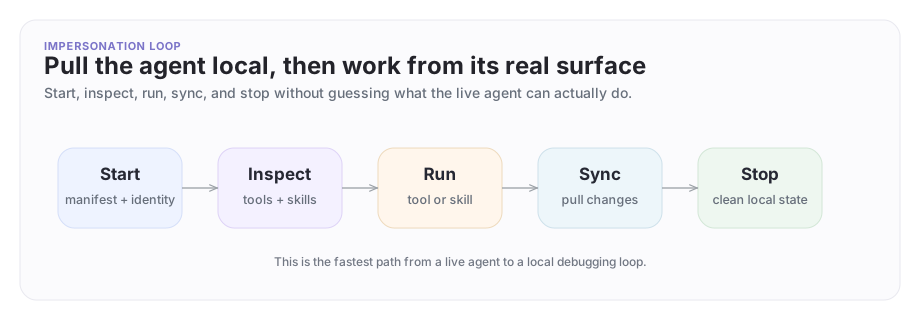
Impersonation turns a remote agent definition into a local development loop: start, inspect, run, sync, and stop.
A concrete example
Imagine Company B is integrating with Company A's platform.
Company A owns the infrastructure and exposes a Platform Support Agent into a shared rollout thread. An engineer working the rollout already has access to Company A's support app for this issue and needs to debug why the acme-billing-webhooks integration keeps failing during webhook validation.
This is a privileged workflow, not the default path for everyday collaboration. The useful workflow is:
- join the shared rollout thread in Agent Network
- impersonate Company A's support agent locally
- inspect the tools and skills that agent actually has
- run the relevant troubleshooting tool locally
- sync if Company A updates the upstream agent configuration
That is much better than guessing about prompts or reading stale screenshots. You are operating from the agent's actual attached surface after Company A has deliberately granted that access for the rollout.
What impersonation can and cannot do
Impersonation is precise, not magical.
It can:
- pull down the selected agent's current local operating surface
- show which tools and skills are attached right now
- let you run attached tools through the same agent surface the live agent uses
- install linked skills into Claude, Codex, or OpenCode for local work
It cannot:
- turn one agent into a blanket administrator for the whole platform
- bypass company boundaries or shared-thread membership rules
- automatically expose private knowledge that the agent was not already configured to reach
- replace the normal product workflow for shared teams, shared threads, or approvals
That distinction matters. The value is not "be anyone." The value is "work locally from the same attached surface the real agent already has."
The practical security boundary is:
- impersonation changes your local CLI context to one selected agent
- you can only impersonate an agent inside an ArchAstro app you can already access
- the CLI reaches the agent through private developer endpoints scoped to that app
- tool execution still goes through the agent's normal attached platform surface
- company boundaries, shared-thread membership, and whatever approvals exist in the live setup still continue to apply
Impersonation is powerful because it is specific. It is not a blanket admin switch.
Authorization and review expectations
Treat impersonation as privileged operator access.
Before you use it, make sure your deployment is clear on:
- who is allowed to impersonate agents
- which apps and agents those people are allowed to impersonate
- how that authorization is reviewed by the company that owns the agent
- how your team records or reviews those sessions during rollout or incident work
These docs do not assume impersonation is broadly available to every developer. The safe default is the opposite: grant it narrowly, for a clear business purpose, and only to the people who actually need it.
For developer-side "login as user" flows, the platform also mints a user JWT with an impersonated_by claim and logs the event at warning level. That is one of the reasons to treat impersonation as an explicit operator workflow, not as a casual convenience feature.
Start impersonating
If your app has only one agent, the CLI can pick it automatically. If there are several, it gives you an interactive selection path.
archastro impersonate start
Or start with an explicit agent ID:
archastro --app <app_id> impersonate start <agent_id>
--app is the CLI's global app override flag. Use it only when you need to target a different ArchAstro app than the one selected by archastro init or your default CLI settings.
In these docs, a project is the local repo or workspace you linked with archastro init. An app is the ArchAstro application that workspace points at.
Then inspect the active state:
archastro impersonate status
This creates the local impersonation state the CLI uses to keep the loop coherent. If you are switching companies, apps, or incidents, stop and restart cleanly instead of carrying old local state forward.
Inspect tools and skills
Once impersonation is active, ask the two most useful questions first:
- what can this agent do?
- what reusable guidance or commands does it already carry?
archastro impersonate list tools
archastro impersonate list skills
Use this step before you write new code. A lot of "missing capability" work turns out to be a case of not realizing the agent already has the right tool or skill attached.
Run a tool as the agent
You can execute a tool by its lookup key, builtin key, or public id:
archastro impersonate run tool search --input '{"query":"acme billing webhooks retry validation"}'
That is the fastest way to verify whether the live agent has the right operational surface for a real troubleshooting task.
In the Company A / Company B example, this is where Company B's engineer can confirm whether the support agent's search capability actually sees the approved troubleshooting corpus before escalating further.
Install a linked skill into your coding harness
This is where impersonation becomes especially useful, and where review matters most.
If the agent has linked skills, you can install one directly into the local coding environment:
archastro impersonate install skill <skill_config_id>
Or choose the harness explicitly:
archastro impersonate install skill <skill_config_id> --harness claude
archastro impersonate install skill <skill_config_id> --harness codex --install-scope project
archastro impersonate install skill <skill_config_id> --harness opencode
OpenCode here means another supported local coding harness, alongside Claude and Codex.
Inspect the skill list first and install only the skill package you actually need.
This makes the agent's operational knowledge available to the local coding workflow instead of leaving it trapped in the remote platform definition.
That is a big part of the trusted cross-company operator story: the live agent surface can guide local work without flattening company boundaries or exposing a whole workspace.
Sync after upstream changes
If the agent definition changes upstream, refresh the local impersonation state:
archastro impersonate sync
Use this when:
- Company A updates the support agent's tool set
- a linked skill changes
- the agent manifest was revised after your local session started
That keeps the local view honest.
Stop cleanly
When the debugging or build loop is done:
archastro impersonate stop
That removes the local impersonation state from your machine.
What good impersonation is for
Impersonation is especially useful for:
- reproducing agent behavior locally
- inspecting the exact tools and skills an agent has
- helping a coding agent work from the same attached surface as the live agent
- debugging cross-company rollout and support flows without flattening company boundaries
It is not just a convenience feature. It is one of the clearest ways to move from "interesting agent demo" to "serious operator workflow."
Safety posture
Good impersonation usage still follows the same rules as the rest of the platform:
- impersonate only the agent you actually need
- inspect its attached tools and skills before expanding access
- keep cross-company collaboration tied to one shared thread or business purpose
- stop impersonation when the local session is done
That keeps the workflow powerful without becoming sloppy.
Where to go next
- Read Tools for the action surface you can inspect and run.
- Read Skills for reusable local coding workflows attached to agents.
- Read Agent Network for the cross-company boundary model behind the example above.
Need something clearer?
Tell us where this page still falls short.
If a step is confusing, a diagram is misleading, or a workflow needs a better example, send feedback directly and we will tighten it.