
CLI
The terminal workflow for building and operating agents.
Overview
The ArchAstro CLI is the fastest way to build and operate agents from the terminal.
Use it to:
- sign in and connect a project
- deploy agents from YAML templates
- create conversations and send test messages
- inspect runs, threads, tools, and knowledge
- manage configs, sandboxes, and installations
If you use a coding agent (Claude Code, Codex, Gemini CLI), the CLI is the primary setup path.
Fastest path
If you want to get from zero to an agent you can test quickly, do this:
- install the CLI
- sign in
- connect the current project with
archastro init - create or deploy an agent
- open a thread and send it a message
The rest of this page expands those steps.
How to think about the CLI
Teams use the CLI in one of three ways:
| Mode | What you are doing |
|---|---|
| First-run setup | Link a repo and create your first testable agent |
| Daily development | Inspect, update, and test agents, routines, threads, and sandboxes |
| Repeatable deployment | Keep configs in files and deploy them in a reviewable way |
--json is a global flag. Scripted examples often place it before the verb, as in archastro --json create agent ....
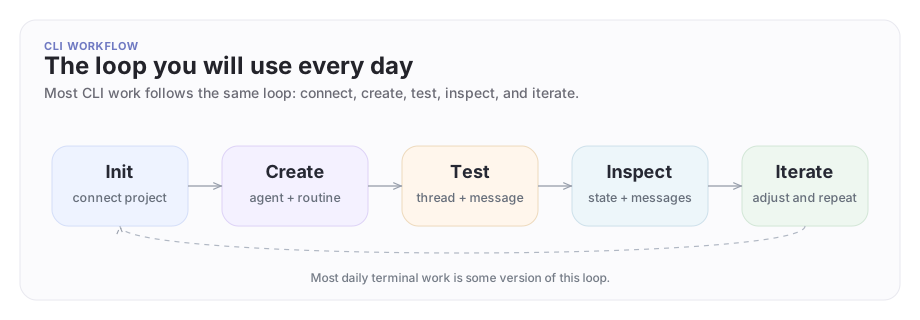
The CLI loop
Connect the repo, create or update the object, test it, inspect the result, then make the next change.
1. Install the CLI
GitHub Releases are the public distribution path for the CLI.
macOS
brew install ArchAstro/tools/archastro
Linux
curl -fsSL https://raw.githubusercontent.com/ArchAstro/archastro-cli/main/install.sh | bash
Windows
irm https://raw.githubusercontent.com/ArchAstro/archastro-cli/main/install.ps1 | iex
If your organization does not allow piped installers, download the release assets from GitHub Releases and inspect them before running them locally.
Verify the install:
archastro --help
2. Sign in
archastro auth login
archastro auth status
The CLI opens a browser so you can sign in and authorize the local session.
Use archastro auth logout when you want to clear the current session.
3. Connect the current project
cd my-project
archastro init
archastro init connects the current directory to ArchAstro and writes an archastro.json file in the project root.
That file tells the CLI which project and config directory the current workspace should use.
In these docs, a project is your local linked workspace. An app is the ArchAstro application that workspace points at.
4. Create an agent you can test
Repeatable setup: deploy from a template
Write an agent.yaml in your project and deploy it in one command:
archastro deploy agent agent.yaml --name "Support Agent"
This is the recommended path. The template is reviewable, reusable, and keeps your agent config in version control alongside your code.
Quick experiment: create an agent directly
If you want to understand each piece individually, you can create an agent directly:
archastro create agent -n "Support Agent" -k support-agent \
  -i "You help users resolve billing and support problems with short, concrete answers."
Here -k sets the agent's lookup key: the key you can search for and reuse in scripts and CLI flows.
The quickest proof that this is an AI agent, not just a saved object, is one direct session:
archastro create agentsession --agent <agent_id> \
  --instructions "Help a user resolve billing questions. Ask one clarifying question if needed."
archastro exec agentsession <session_id> \
  -m "How should we handle invoice failures?"
If you want the agent to react automatically inside the product, add a routine:
archastro create agentroutine --agent <agent_id> \
  -n "Reply to new messages" \
  -e message.created \
  -t script \
  --script "{ handled: true }"
archastro activate agentroutine <routine_id>
message.created is the basic "new thread message arrived" event. script is the smallest handler type and is useful for proving the wiring before you move into richer workflow-backed behavior.
New routines start in draft, so save the routine ID from the create command and activate it before you test thread traffic.
That inline script still runs under the same scoped platform access rules as the agent and routine that triggered it. It is useful for small deterministic checks, not as a replacement for reviewable workflows.
For anything beyond this first proof, move the logic into a proper script or workflow where you can inspect and test the input shape directly.
Direct session versus thread
The CLI exposes both because they solve different problems:
agentsessionis the quickest direct test of the agent itself- threads and messages are the product conversation surface used over time
Start with an agentsession when you want a quick proof. Move to threads when you want to inspect the full runtime loop with members, messages, and ongoing behavior.
A realistic first CLI session
Here is what a first CLI session looks like:
- run
archastro initin the repo you care about - create one agent with a very narrow job
- run one direct agent session and inspect the result
- create and activate one routine that reacts to
message.created - create one test user and one test thread
- send one message
That is enough to answer the questions teams have on day one:
- Did we connect the right project?
- Can we create agents from the terminal?
- Does the agent actually participate in conversations?
- Can we inspect and iterate from here?
5. Open a thread and send a message
Create a thread that the agent owns:
archastro create thread -t "Support" --owner-type agent --owner-id <agent_id>
Create or reuse a user who will send the test message:
archastro create user --system-user -n "Demo User"
--system-user creates a bot-style non-login user. Use it when you need test traffic from the CLI without creating a person account.
If you later need machine-to-machine auth for that identity, issue a dedicated system-user access token instead of trying to log in as a person. Those tokens are separately minted, can be listed and revoked, and are checked against the platform's system-token registry on use.
Add that user to the thread:
archastro create threadmember --thread <thread_id> --user-id <user_id>
Then send a message:
archastro create threadmessage --thread <thread_id> --user-id <user_id> \
  -c "How should we handle invoice failures?"
Add --wait when you want the CLI to stay attached and print the resulting response activity before returning.
This is the shortest path to proving that the agent exists, can join a conversation, and can start doing work in that thread.
What can go wrong
The CLI is not authenticated
Not authenticated. Run: archastro auth login
Fix:
archastro auth login
archastro auth status
The current repo is not linked
No archastro.json found. Run: archastro init
Fix:
archastro init
The project is linked, but the token is missing
No token for this project. Run: archastro init
Fix:
archastro init
If the repo was already linked and the local session was cleared later, run both:
archastro auth login
archastro init
Common workflows
Inspect and manage agents
archastro list agents
archastro describe agent <id>
archastro update agent <id> -n "Senior Support Agent"
archastro delete agent <id>
Use this loop when you are tuning instructions, names, routines, or ownership and want to confirm the live object state.
Manage conversations
archastro list threads
archastro describe thread <id>
archastro list threadmembers --thread <id>
archastro list threadmessages --thread <id>
archastro list threadmessages --thread <id> --full
--full switches from the compact message table to the full conversation view.
This is the quickest way to answer "what happened?" when a test did not behave the way you expected.
Add a computer to an agent
archastro list agentcomputers --agent <id>
archastro create agentcomputer --agent <id> -n "dev"
archastro describe agentcomputer <id>
Reach for this when an agent needs a managed computer environment rather than only message- and workflow-based behavior.
Operate the serious surfaces
Once you move beyond a first agent, the CLI becomes an operator console for the live platform surface:
# Become the agent locally
archastro impersonate start <agent_id>
archastro impersonate list tools
archastro impersonate list skills

# Inspect knowledge state
archastro list contextsources
archastro list contextingestions --status failed

# Inspect installations and tool attachments
archastro list agentinstallations --agent <agent_id>
archastro list agenttools --agent <agent_id>

# Inspect durable memory
archastro list agentworkingmemory --agent <agent_id>
The day-to-day loop for agent development:
- inspect what the agent is attached to
- inspect what it can use
- inspect what it remembers
- debug the agent's tool and skill surface before changing prompts
Privileged workflows such as impersonation are deliberate operator actions. Use them only from the app and company context your deployment has explicitly approved.
Work with config files
archastro configs sync
archastro configs deploy
mkdir -p ./tmp
archastro configs sample workflow --to-file ./tmp/workflow.sample.yaml
archastro configs validate -k workflow -f ./tmp/workflow.sample.yaml
archastro configs sample <kind>
Config files become more important as the setup gets larger. If you are still exploring the product, direct create commands are simpler. Once you know what you want, move the stable setup into files.
Read Configs for the full file-backed workflow.
Common command groups
Think of these groups in the same order you would build with ArchAstro:
- agents
- users and teams
- threads and messages
- sandboxes and automations
- knowledge, tools, and installations
- config files and project-level setup
Agents
archastro list agents
archastro describe agent <id>
archastro create agent -n "Support Agent"
archastro update agent <id> -n "New Name"
archastro delete agent <id>
Users
archastro list users
archastro describe user <id>
archastro create user -e alice@example.com -n "Alice"
archastro create user --system-user -n "Demo User"
archastro delete user <id>
Teams
archastro list teams
archastro describe team <id>
archastro create team -n "Engineering"
archastro update team <id> -n "New Name"
archastro delete team <id>
Threads
archastro list threads
archastro describe thread <id>
archastro create thread -t "Project thread" --user <user_id>
archastro create threadmember --thread <thread_id> --agent-id <agent_id>
archastro create threadmessage --thread <thread_id> --user-id <user_id> -c "Hello"
Use --skip-welcome-message on thread creation when you want the first visible message in the thread to be the one you send on purpose. Use --wait on create threadmessage when you want the CLI to stay attached for the response loop.
Automations
archastro list automations
archastro describe automation <id>
archastro create automation -n "Daily Report" -t scheduled --schedule "0 8 * * *"
archastro activate automation <id>
archastro pause automation <id>
archastro delete automation <id>
Knowledge
archastro list integrations
archastro list contextsources
archastro list contextingestions --status failed
archastro list contextitems --source <source_id>
Tools
archastro list agenttools --agent <id>
archastro describe agenttool <id>
archastro create agenttool --agent <id> --kind builtin --builtin-tool-key search
archastro activate agenttool <id>
Installations
archastro list agentinstallationkinds
archastro list agentinstallations --agent <id>
archastro create agentinstallation --agent <id> --kind web/site --config '{"url":"https://example.com"}'
archastro describe agentinstallation <id>
Impersonation
archastro impersonate start <agent_id>
archastro impersonate status
archastro impersonate list tools
archastro impersonate list skills
archastro impersonate run tool search --input '{"query":"acme billing webhooks"}'
archastro impersonate stop
Skills
archastro list skills
archastro describe skill <slug>
archastro create skill -n "Incident Review" --file ./skills/incident-review/SKILL.md
archastro describe skillfile incident-review SKILL.md
Memory and routine runs
archastro list agentworkingmemory --agent <id>
archastro list agentroutineruns --routine <id>
archastro list automationruns --automation <id>
Files and project setup
archastro list files
Use the developer portal for domains, webhooks, and other project-level setup that does not need to live in your terminal workflow.
Configs
archastro configs init
archastro configs kinds
archastro configs sync
archastro configs deploy
archastro configs sample <kind>
mkdir -p ./tmp
archastro configs sample workflow --to-file ./tmp/workflow.sample.yaml
archastro configs validate -k workflow -f ./tmp/workflow.sample.yaml
Use configs when the setup has graduated from exploration into something you want to keep in files and review like code.
Scripts
archastro script validate -f ./path/to/script.yaml
archastro script run -f ./path/to/script.yaml --input '{"key": "value"}'
archastro script docs
Organizations
Organization setup is typically handled as part of operator-managed multi-company deployment work, not as part of the normal first-run CLI path.
Use Organizations to understand the boundary model when your deployment includes company-specific spaces.
Sandboxes
archastro list sandboxes
archastro describe sandbox <id>
archastro create sandbox -n "Staging" -s staging
archastro activate sandbox
archastro list sandboxmails --sandbox <sandbox_id>
Here -s sets the sandbox slug: the short unique key for that sandbox inside the app.
activate sandbox re-authenticates with a sandbox-scoped token. Pass a sandbox ID directly (activate sandbox <id>) or omit it to get an interactive selection flow.
Scripting with JSON output
All commands support --json, which makes the CLI easy to use from shell scripts and coding-agent workflows.
archastro list agents --json | jq -r '.data[].id'

USER_ID=$(archastro create user -e bot@example.com --system-user --json | jq -r '.id')

archastro list teams --json | jq '.data[] | select(.name | contains("Eng"))'
Because --json is global, archastro --json create user ... works too. Use whichever placement you prefer, but keep it consistent inside a script.
Shell completion
eval "$(archastro completion bash)"
eval "$(archastro completion zsh)"
archastro completion fish | source
Project files
| File | Purpose |
|---|---|
./archastro.json |
Project mapping and local CLI settings |
Need something clearer?
Tell us where this page still falls short.
If a step is confusing, a diagram is misleading, or a workflow needs a better example, send feedback directly and we will tighten it.