Embed
Step into a live agent's exact tools and skills from Claude Code, Codex, Cursor, or Rovo Dev.
Overview
Open Claude Code, Codex, Cursor, or Rovo Dev inside any repo and type the embed command. Pick one of the agents in your org. Your coding agent now sees that agent's exact tools and skills, on your machine, scoped to one session. Run a tool. Reproduce a thread. Debug the routine a customer's been complaining about. When you're done, exit, and your session is back to normal.
That's the whole idea. Embed is the same surface the live agent uses, on your laptop, attached to your coding agent for one focused session.
The command depends on the harness:
- Claude Code:
/embed - Codex:
$embed - Cursor:
@archagents embed - Rovo Dev:
archastro embed start --harness rovofrom a terminal; Rovo Dev auto-loads the installed skills
CLI subcommands sit underneath for scripting and automation, and they're documented further down. The path most operators want is the one-liner inside their coding agent.
The embed loop
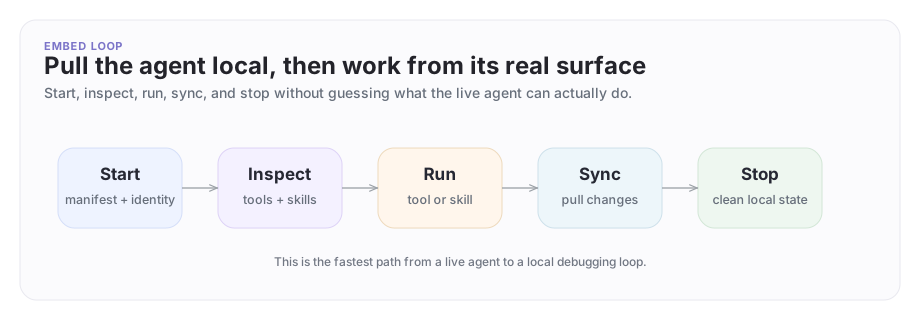
An embed session turns a remote agent definition into a local development loop: start, inspect, run, sync, and stop, all from inside your coding agent.
A concrete example
Your app runs a Support Agent inside the Acme Corp organization, and a customer has reported an answer that looks wrong. The engineer on it:
- From Claude Code or Codex, runs the embed command to step into the support agent.
- Lists the agent's tools and skills.
- Runs the relevant troubleshooting tool through the embed surface, against the same knowledge the live agent reads.
- Syncs if the agent is revised during the session.
The engineer is now operating from the support agent's exact attached surface, inside the one organization it belongs to.
What embed is, and what it isn't
Embed is precise.
It does:
- pull the selected agent's current local operating surface onto your machine
- show which tools and skills are attached right now
- let you run those tools through the same surface the live agent uses
- install the agent's linked skills into Claude Code, Codex, Cursor, or Rovo Dev for local work
It does not:
- promote one agent into a blanket platform administrator
- bypass company boundaries or shared-thread membership
- expose private knowledge the agent wasn't already configured to reach
- replace the normal product workflow for networks, threads, or approvals
The platform's security boundary is explicit:
- Embed changes your local coding-agent context to one selected agent.
- You can only embed an agent inside an ArchAstro app you can already access.
- The local plugin reaches the agent through private endpoints scoped to that app.
- Tool execution still goes through the agent's normal attached platform surface.
- Company boundaries, shared-thread membership, and any approvals in the live setup continue to apply.
That precision is the value. Embed gives you the live agent's exact surface, not blanket new authority.
Treat it as privileged operator access
Before rolling embed out broadly, the company that owns the agent decides:
- who is allowed to embed agents
- which apps and agents those people can embed
- how that authorization is reviewed
- how sessions are recorded or reviewed during rollouts and incidents
The safe default is narrow: grant embed access to the people who need it for a clear business purpose, and review it the way you'd review any other privileged access. For developer-side "login as user" flows, the platform mints a user JWT with an impersonated_by claim and logs the event at warning level. The audit trail is built in.
The path most operators use: from your coding agent
Run setup once from your terminal so the local plugin is installed:
archastro setup
Restart Claude Code or Codex after setup so the plugin loads. From here on, every embed step happens inside your coding agent.
Start
Each agent's Overview tab in Developer Portal shows an Embed locally snippet you can copy. The agent ID is baked in so you don't have to pick from a list.
In Claude Code:
/embed agi_033O8eWUv2SYzXO3MtTiwy
In Codex:
$embed agi_033O8eWUv2SYzXO3MtTiwy
In Cursor:
@archagents embed agi_033O8eWUv2SYzXO3MtTiwy
You can also run the bare command (/embed, $embed, @archagents embed) without an agent ID. If the app has a single agent, the command picks it; if several are available, the command walks you through an interactive selection. To target a different ArchAstro app, update the CLI context first from your terminal, then start an embed session again from your coding agent.
Starting also installs the agent's linked skills into every coding harness embed detects, so they're available the moment the session begins. The agent's identity, tools, and the installed skills (with their invocation commands) are written into a local identity file your coding agent reads.
Inspect
Once an embed session is active, ask the two most useful questions first:
- What can this agent do?
- What reusable guidance or commands does it already carry?
The same embed entry point lists the agent's tools and skills. Most "missing capability" reports turn out to be agents that already have the right tool or skill attached.
Run a tool
Ask your coding agent to use the embedded agent's tools for the task at hand. That's the fastest way to confirm whether the live agent has the operational surface a real troubleshooting task needs. In the Company A / Company B example, this is where the engineer confirms that the support agent's search capability actually reaches the approved troubleshooting corpus before escalating.
Use the linked skills
Linked skills are reusable local workflows attached to the agent: runbooks, custom commands, structured prompts. Starting an embed session installs all of them into every coding harness it detects, and the identity file lists each one with the command that invokes it and the directory it lives in, so they're ready to use immediately.
This is where embed becomes especially valuable: the agent's operational knowledge becomes available to the local coding workflow, instead of staying trapped in the remote platform definition. Installing the linked skills doesn't flatten company boundaries or expose a whole workspace.
Sync after upstream changes
If Company A updates the support agent's tool set, a linked skill changes, or the manifest is revised after your local session started, refresh from the same embed entry point. Local state stays honest with the live definition.
Stop cleanly
When the session is done, stop the embed session from the same place. The platform removes local embed state from your machine, and your coding agent returns to its normal context.
CLI reference for scripting
The CLI subcommands underneath the plugin exist for automation, CI hooks, and the rare case where a coding agent isn't part of the loop. They write to the same local state the plugin manages, so an embed session started from the CLI works the same inside Claude Code or Codex.
# start a session for a specific agent (or run with no argument to pick interactively)
archastro embed start <agent_id>

# show the active session
archastro embed status

# list the active agent's tools and skills
archastro embed list tools
archastro embed list skills

# install a linked skill into the local coding harness
archastro embed install skill <skill_id>

# execute one of the active agent's tools by ID, lookup key, or builtin tool key
archastro embed run tool <tool>

# refresh local state after upstream changes
archastro embed sync

# end the session
archastro embed stop
Use these when you're scripting against the loop. The interactive operator path stays inside your coding agent.
Common use cases
- Reproduce a live agent's behavior locally.
- Inspect the exact tools and skills an agent has.
- Help your coding agent work from the same attached surface as the live agent.
Best practices
- Embed only the agent you actually need.
- Inspect attached tools and skills before requesting more access.
- Stop the embed session when the local session is done. The manifest, identity files, and skill installations come back off your machine cleanly.
Where to go next
Need something clearer?
Tell us where this page still falls short.
If a step is confusing, a diagram is misleading, or a workflow needs a better example, send feedback directly and we will tighten it.